Building Skiagrafia, an AI Pipeline for Designers
I. The Mosaic as a Way of Thinking
I have been laying mosaics for more than thirty years.
Not the ones with glass and stone, though I know those too, but with pixels, words, images, patterns, and any element that can be drawn into the orbit of a central subject. The logic has always been the same: you take fragments, arrange them according to a system of relationships, and at the right distance, something coherent appears. An image. A structure. An idea.
A mosaic is never one material. It is a conversation between materials. Gold tesserae catch the light differently from smalti. Stone reads flat up close and luminous from far away. The grout, the negative space, is not empty: it defines rhythm, holds tension, and gives the eye a place to rest. Remove any single component, and the whole degrades. Not suddenly, not catastrophically, but quietly and inevitably.
I built Skiagrafia with this logic. Not as a metaphor. As a literal engineering principle.
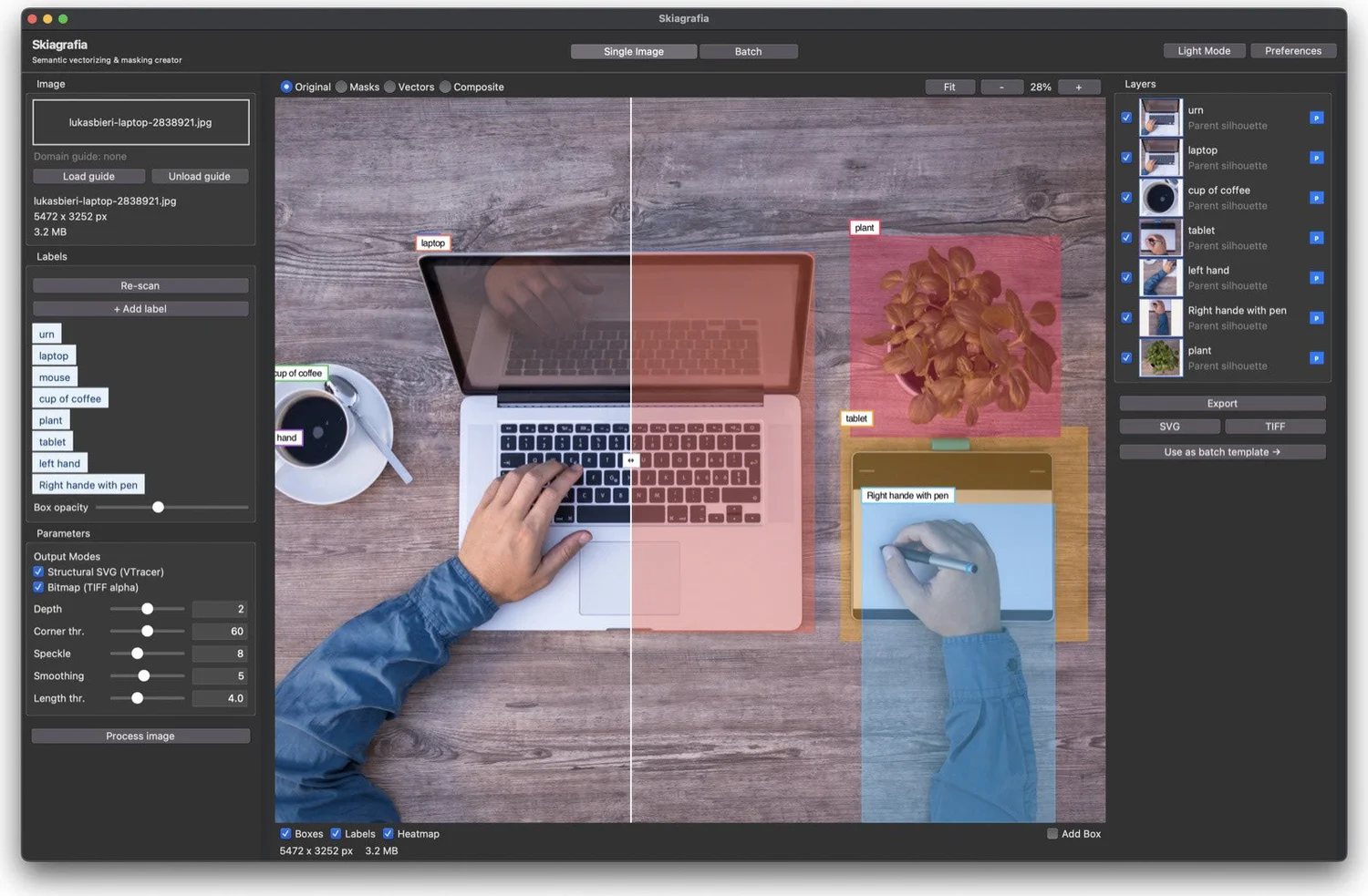
Skiagrafia, from the Greek σκιαγραφία, meaning "the art of painting with shadows and light," is a local, batch-capable MacOS desktop application written in Python. It takes folders of photographs and produces layered vector graphics and transparent bitmap masks. It is designed for designers, illustrators, and motion artists who need to process large collections of images: isolate objects, extract clean silhouettes, and generate production-ready SVG files. Everything runs entirely on your machine. No cloud. No API bills. No data leaving your studio.
What I want to describe here is not the finished product but the architecture and thinking that produced it. The sketches before the code. The decisions before the system. The individual tesserae before the mosaic.
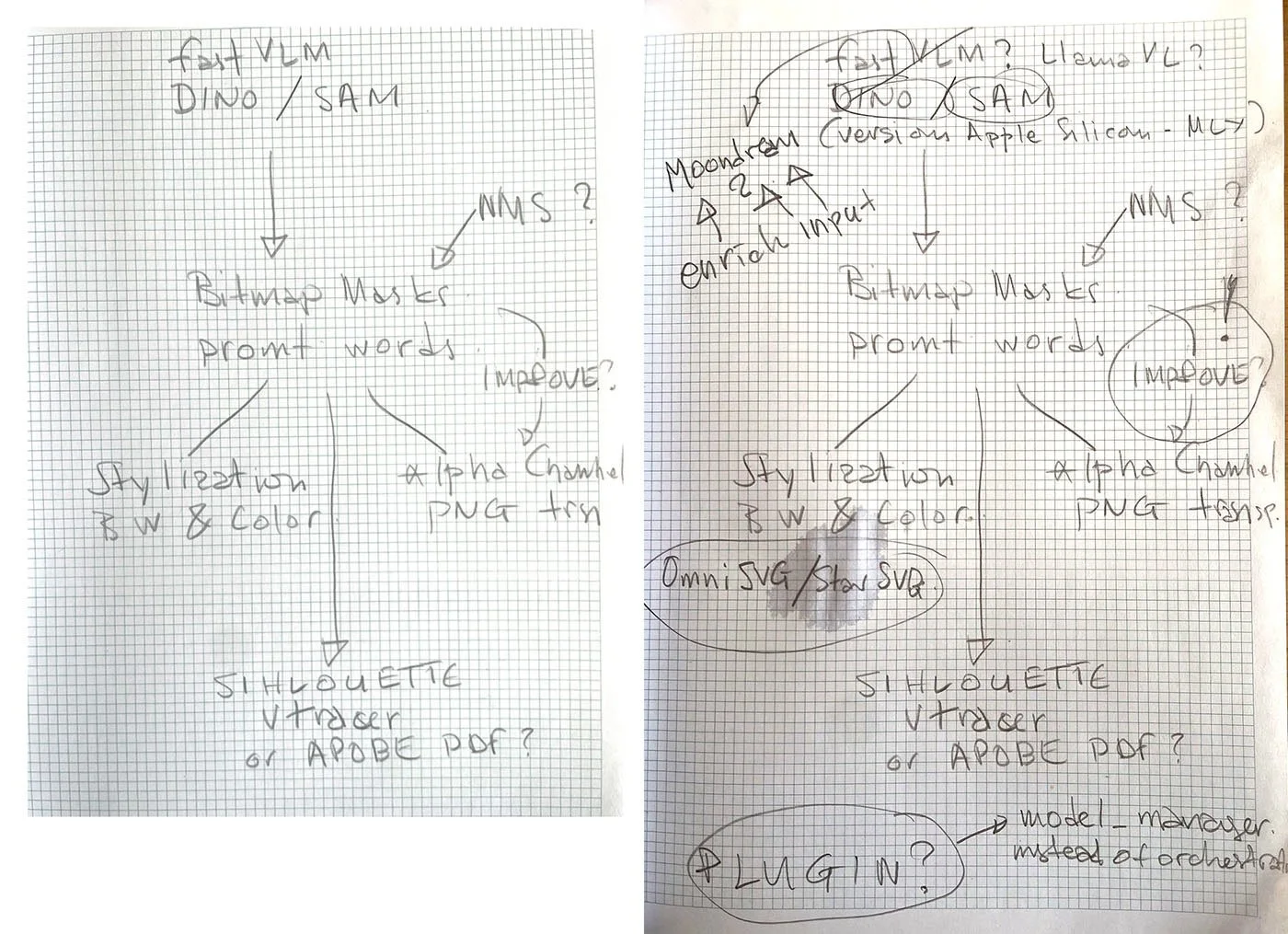
The two original sketches for Skiagrafia, side by side: the first attempt on the left, the second on the right. Between them, you can watch the thinking grow more honest. Certainties become questions, new models appear in the margins, and two words in an ellipse (OmniSVG / StarSVG) signal a path that would be explored and eventually abandoned.
II. The First Sketch: A Dialogue With Yourself
Every system begins as a question.
The first sketch I drew for Skiagrafia is embarrassingly simple. On a page of graph paper: three words at the top, an arrow pointing down, three diverging paths at the bottom. In the margin, two questions with no answers yet.
The second sketch is a fresh page. Not the same diagram made tidier, but a new attempt that is more complicated because the thinking has grown more honest. The three words at the top have become a question. New bubbles have appeared, with model names to try. Old certainties have been crossed out. One word — IMPROVE? — has been circled and given an exclamation mark, promoted from a marginal note to an active problem. And at the bottom of the page, barely fitting before the margin, a new question: PLUGIN? The thinking is already outgrowing the original idea of what the system should be.
In the middle of the second sketch, there is a small ellipse containing two words: OmniSVG / StarSVG. Those two words would spend weeks in the system before being excised entirely. A story for later.
These sketches are not architecture. They are the record of a designer trying to understand what the system needs to be before deciding what it needs to do. Every open questions: NMS? Plugin? VLM? These are a genuine uncertainty, not a placeholder. The sketch is the externalization of a conversation with yourself. The second page exists because the first page ran out of room for doubt.
What the sketches reveal, looking at them now, is that the core design problem was always the same one: how do you chain together a set of specialized AI models, each excellent at one thing, into a coherent pipeline that produces professional output?
This is the mosaic problem. You have tesserae of different materials. You need them to hold together.
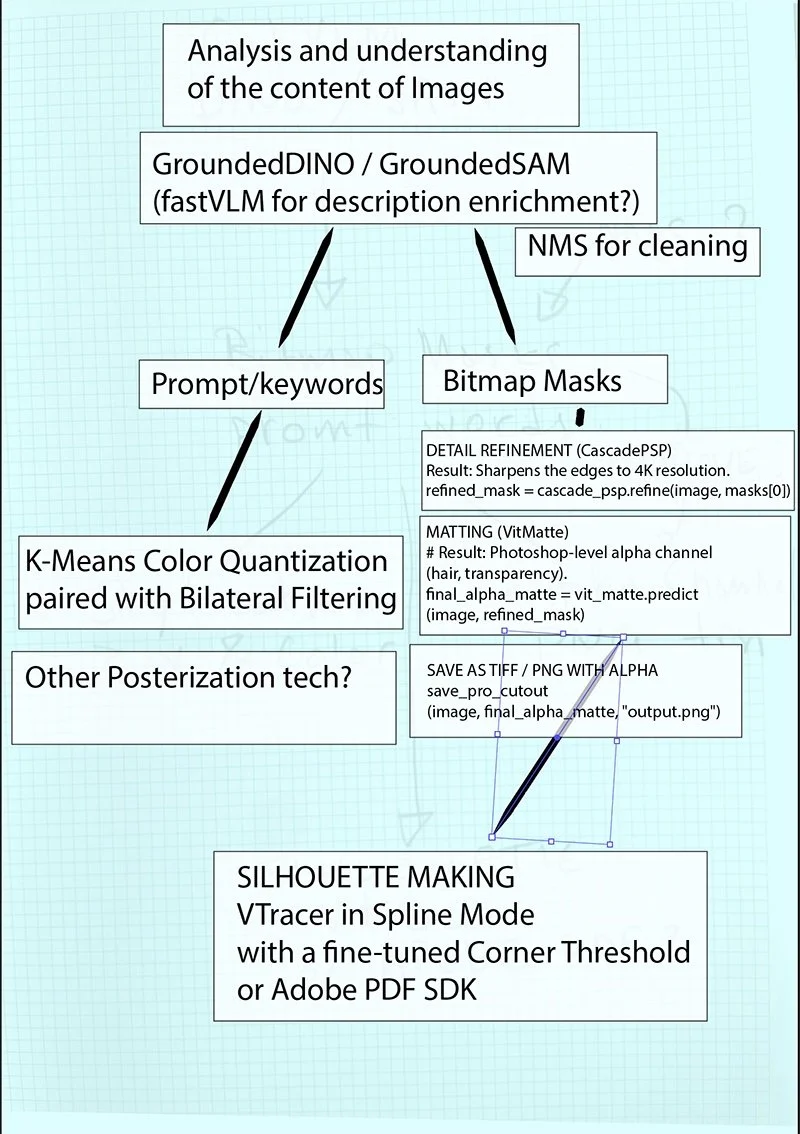
An early digital elaboration of the first sketch — the hand-drawn arrows have become a typed flowchart, but the thinking is still exploratory. Pseudo-code has appeared alongside the boxes, model names are being tested against each other, and the question marks are still everywhere. The pencil sketch underneath is still visible through the diagram, a ghost of the earlier attempt.
III. Choosing Your Tesserae: How to Select AI Models
Before I describe the architecture, I want to spend time on model selection, because this is the part most articles skip. They show you the system and tell you which models are in it; they don't tell you why those models and not others.
I applied four criteria to every model I considered.
The first was output quality. But quality, as a designer understands it, is not what a benchmark understands it. Benchmarks measure segmentation accuracy on standardized datasets. I needed to know whether the output would survive scrutiny at a client presentation. Clean mask edges, semantically correct segmentation (the system finds the jersey, not just a patch of color at the jersey's location), and vector paths you could hand to a printer. These are qualitative criteria, and they require looking at output rather than reading papers.
The second was Apple Silicon compatibility. My machine is a Mac Studio with an M1 Ultra and 128GB of unified memory. Apple's MPS (Metal Performance Shaders) framework provides GPU acceleration on Apple Silicon, but not every model runs on it cleanly. Some require CUDA-specific operations with no MPS equivalent; some trip on integer operations that MPS handles poorly; some simply need more dedicated VRAM than a standard GPU offers, but work fine with Apple's unified memory architecture. Every model in Skiagrafia had to run on MPS as the primary backend, with CPU as a graceful fallback, not the other way around.
The third was speed at the batch scale. Skiagrafia is designed to process 2,000+ images. At that scale, a model that takes five seconds per image costs nearly three hours of compute just for its own slice of the pipeline. Models had to be fast, or their workload had to be parallelizable.
The fourth was strict local operation. All inference runs on-device. TRANSFORMERS_OFFLINE=1 and HF_HUB_OFFLINE=1 are set as environment variables before any imports touch the network. This isn't only a privacy requirement for client work; it's a reliability requirement. A pipeline that depends on an external API will fail the moment that API has a bad day.
With those four criteria in mind, here is how each model was chosen.
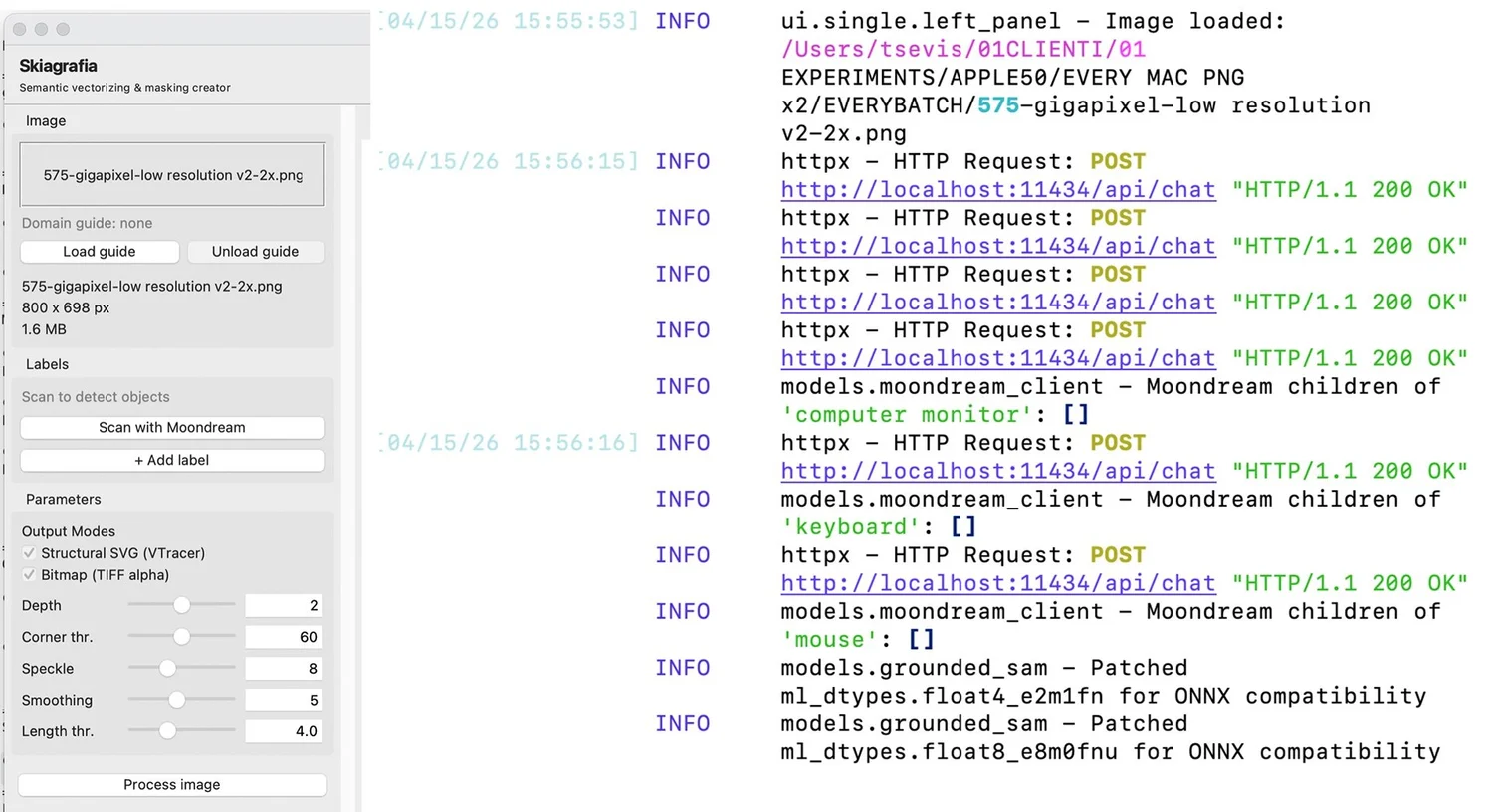
Skiagrafia's single image mode mid-interrogation: the left panel shows an 800×698px image loaded and ready, with VTracer and bitmap output modes selected and parameters set. The terminal log on the right shows Moondream making a series of HTTP calls to the local Ollama server, querying for child objects of each detected label "computer monitor", "keyboard", "mouse" , before GroundingDINO loads and patches its ONNX-compatibility layer. Everything is running locally; nothing is leaving the machine.
Moondream 2 via Ollama: The Interrogator
Every image in a batch begins its journey through Skiagrafia with a question: What is in this image?
This sounds trivial. It is not. The downstream pipeline: detection, segmentation, and vectorization is text-conditioned. It needs words. It needs to be told "player", "ball", "jersey", "logo" before it can find those things. Interrogation is what makes the pipeline *semantic* rather than purely statistical.
Moondream 2 is a compact vision-language model, one that accepts both an image and a text prompt and produces a text response. It runs through Ollama, a local model runtime that exposes a clean HTTP API. From Skiagrafia's perspective, interrogation is a simple HTTP call: send an image and receive a JSON object containing a list of detected nouns.
The specific choice of Moondream over alternatives like LLaVA, LlamaVL, MiniCPM-V came down to speed and size. At approximately 1.5GB in weight, Moondream processes an image in roughly 100 milliseconds on the M1 Ultra. Larger models produce richer descriptions, but for this task, generating a label list, not writing a poem, Moondream's output is sufficient. The marginal quality gain from a 7B-parameter model does not justify a 10× increase in inference time when you are processing 2,000 images.
Moondream has known limitations. Like all vision-language models, it has a bias toward high-entropy regions, such as faces, large colorful shapes, and text. Low-contrast objects, thin structural elements, and small details are sometimes missed. Skiagrafia handles this through a GuidedInterrogator that maintains a fallback chain: if the primary model's output is insufficient, secondary models are tried in sequence. A tiled processing mode breaks large images into a 2×2 grid, running the model on each quadrant to recover details lost at full image scale. A KnowledgePack system allows domain-specific label taxonomies that bias the interrogation toward known objects.
None of this eliminates the limitation. But it manages it gracefully.
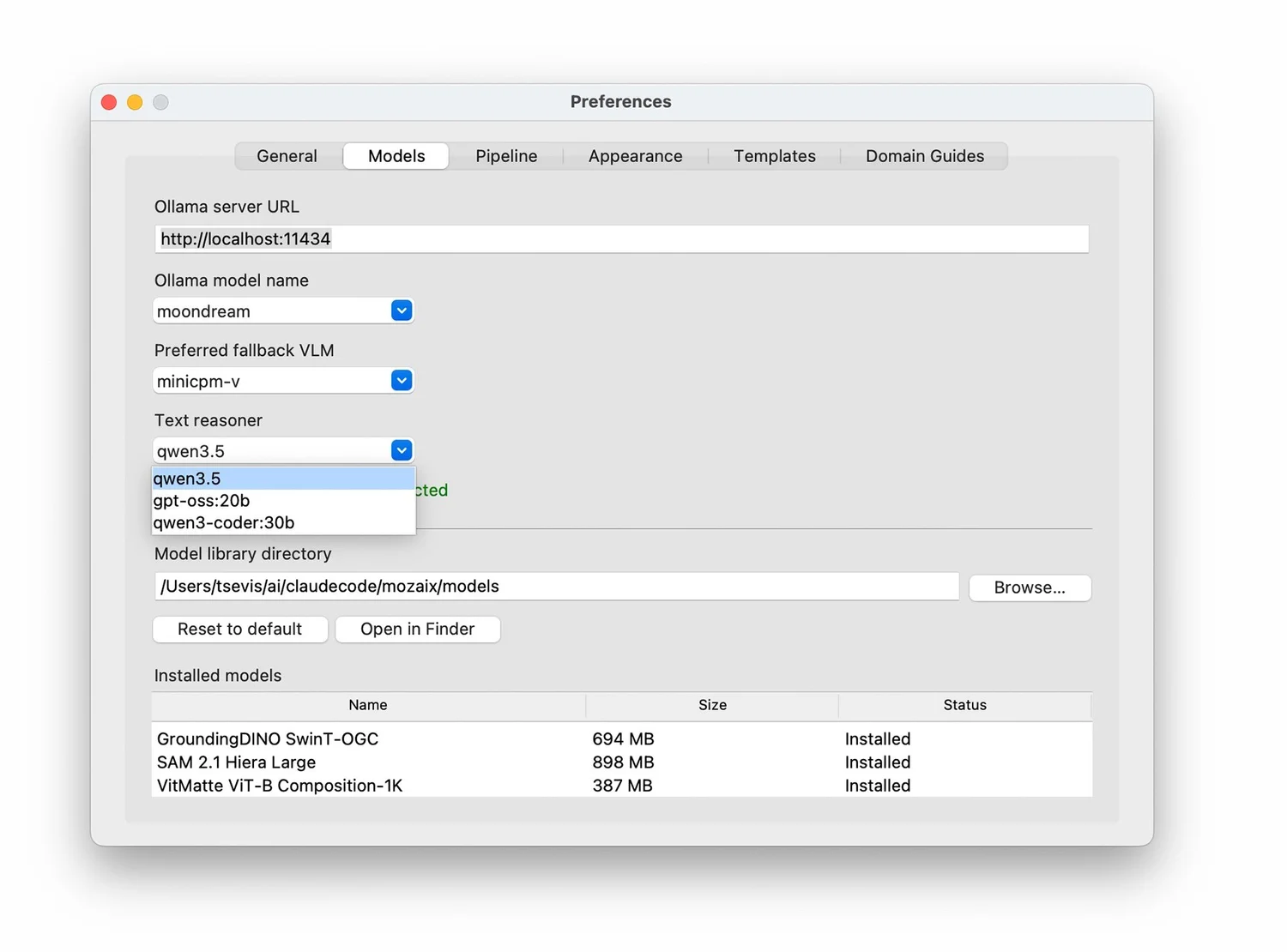
The Models tab of Skiagrafia's Preferences window, showing the Ollama server URL, model selections (Moondream as primary VLM, MiniCPM-V as fallback, Qwen 3.5 as text reasoner), the shared model library directory, and the three installed models: GroundingDINO, SAM 2.1, and VitMatte with their on-disk sizes.
GroundingDINO: The Locator
Once the interrogator has produced a list of labels, those labels need to be located in the image. This is the detection step, and it requires a different kind of model: one that understands both language and geometry.
GroundingDINO is a text-conditioned object detection model that builds upon DINO (DETR with Improved deNOising anchor boxes). You give it an image and a text prompt "player", and it returns a bounding box: the rectangular region where that object most likely lives, with a confidence score attached. This is qualitatively different from classical object detection, which classifies from a fixed vocabulary. GroundingDINO can find *any object you can describe in words*.
The model runs at approximately 660 MB and operates through the GroundedSAM wrapper in Skiagrafia, which bundles it with SAM 2.1. Detection and segmentation are conceptually separate steps but physically coupled: GroundingDINO produces boxes, SAM consumes them.
The configurable thresholds box_threshold (default 0.35) and text_threshold (default 0.25) control sensitivity. Lowering them finds more objects, including uncertain ones. Raising them reduces false positives. This is the *det_threshold* question from the original sketches, still alive in production.
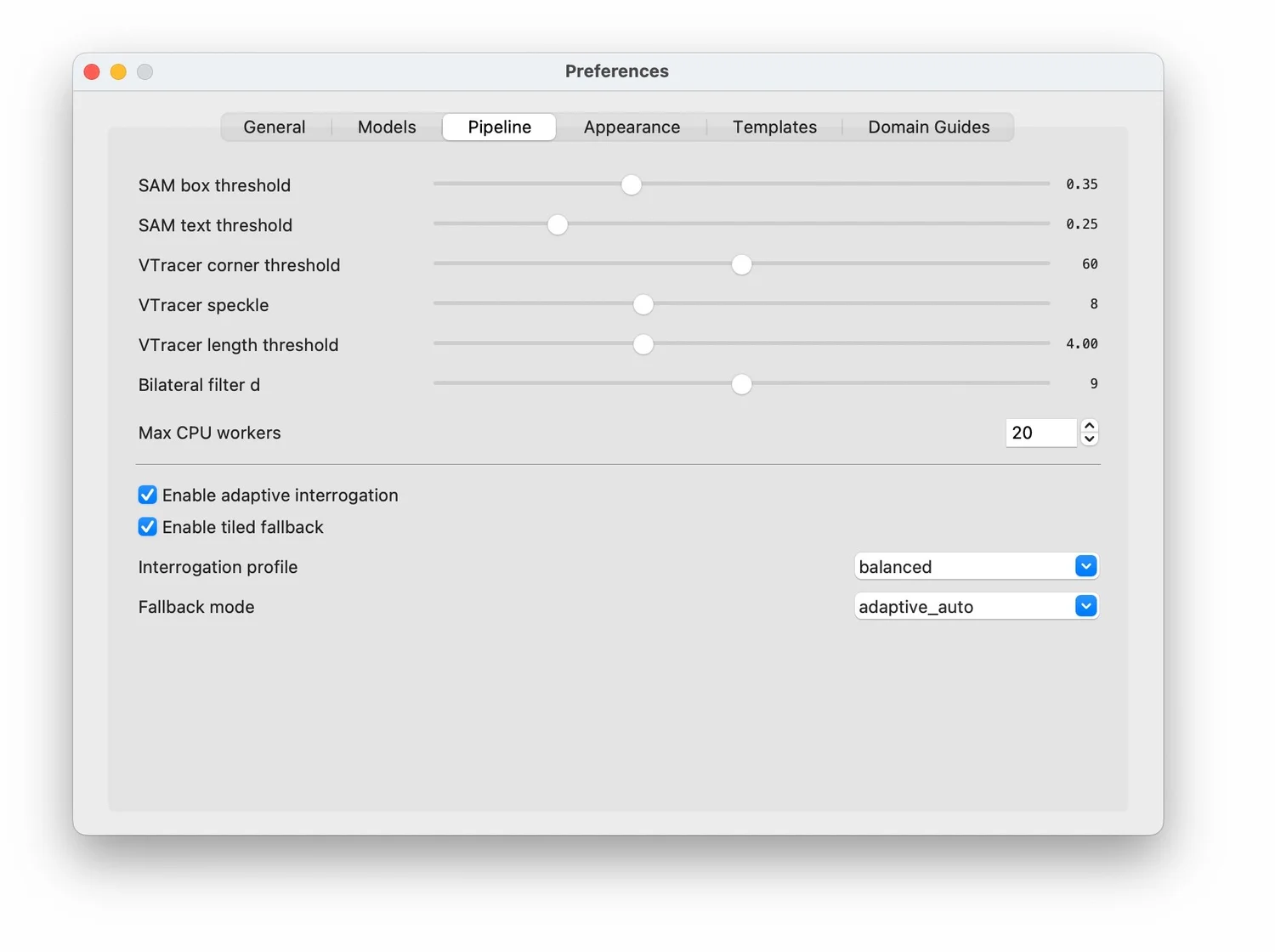
The Pipeline tab exposes every parameter that controls the quality-versus-speed trade-off: GroundingDINO's detection sensitivity, VTracer's spline-fitting precision, the bilateral filter's smoothing radius, and the interrogation strategy. All adjustable without touching the code.
SAM 2.1 HQ (Segment Anything Model): The Mason
If GroundingDINO is the model that says "the player is roughly here", SAM 2.1 HQ is the model that says, "and these are *exactly* the pixels that belong to the player."
Segmentation, generating a precise pixel-level mask from a bounding box, is SAM's task. The "HQ" suffix refers to High Quality weights, specifically fine-tuned to produce cleaner mask boundaries than the base model. The Hiera Large backbone used in Skiagrafia is the most capable SAM variant that fits within the MPS memory envelope.
SAM is what most visibly separates Skiagrafia's output from a naive approach. A color-threshold or edge-detection algorithm produces masks that follow pixel-level color differences. SAM produces masks that follow the boundaries of the *object*. It understands that a jersey is a distinct object from the skin of the arm it covers, even when the color difference is subtle.
The most architecturally interesting use of SAM is the recursive child segmentation. After the parent object (the player) is masked, the pipeline crops the original image to the parent's bounding box and runs GroundingDINO + SAM again on that crop, searching for child elements — jersey, logo, number. Each detected child produces its own mask. The parent's "body" mask is then generated by boolean subtraction: parent minus all child masks, yielding the parts of the player not covered by any identified child element.
Each child mask is then remapped from crop-space coordinates back to full-image coordinates via coord_math.py. This coordinate remapping is the kind of detail that is trivially easy to get wrong and invisible when it is right.
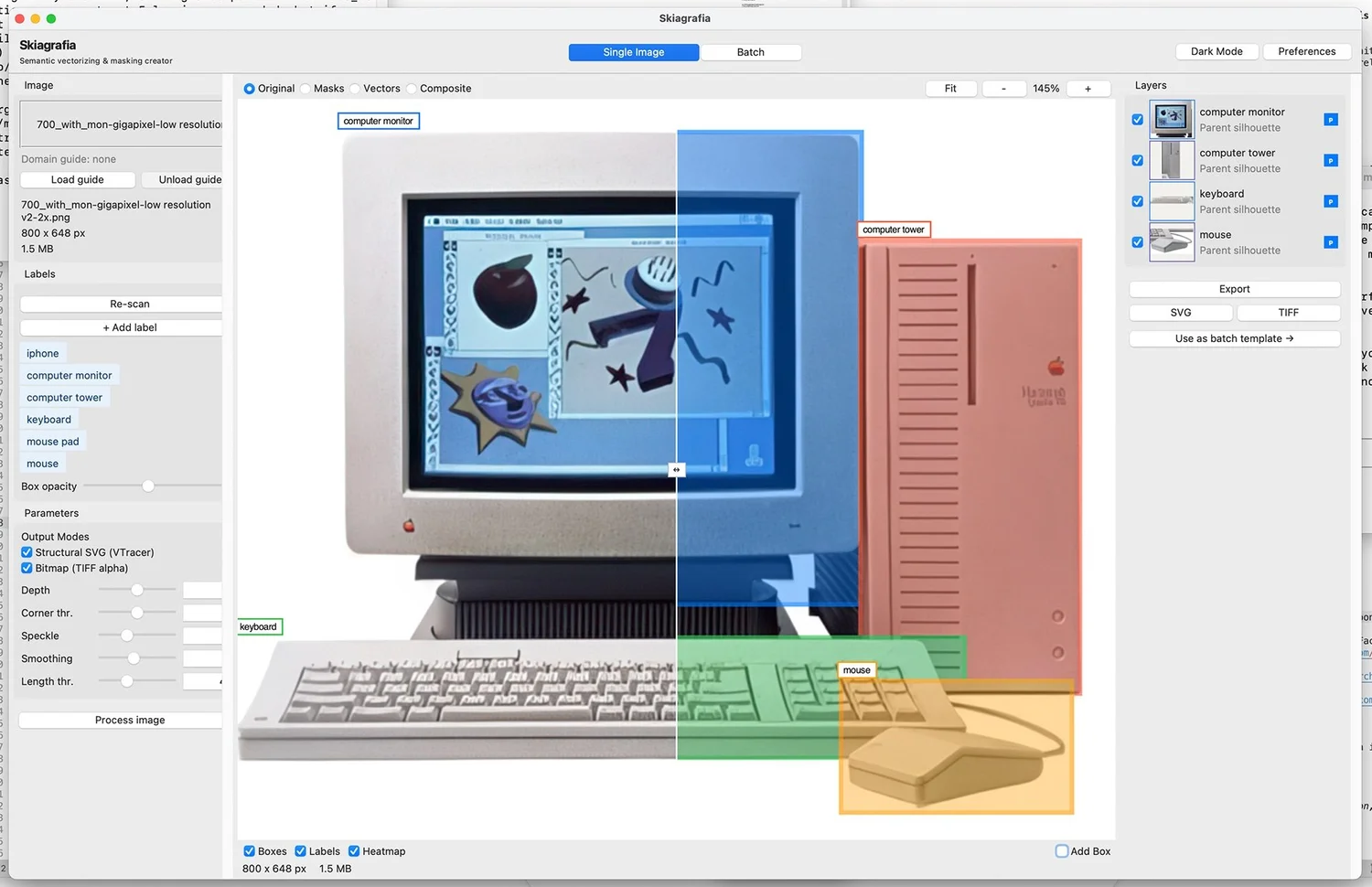
GroundingDINO has located four objects in a photograph of a vintage Macintosh setup: a computer monitor, a computer tower, a keyboard, and a mouse, each outlined in a different colored bounding box. The canvas shows the Masks overlay at 145% zoom, split down the middle: the left half renders the original image, and the right half shows the blue segmentation mask for the monitor, already computed. The Layers panel on the right confirms all four detections are queued as parent silhouettes, ready for SAM to turn each box into a precise pixel mask.
VitMatte: The Edge Refiner
A binary mask is a hard edge. The player exists or doesn't at each pixel, with no gradation. For most design applications, such as compositing, motion graphics, and print, this is insufficient. Hair, fur, semi-transparent fabric, motion blur: these require a soft edge, a pixel-level alpha value that says "this pixel is 80% player and 20% background."
This is the alpha matting problem, and VitMatte is a Vision Transformer specifically trained to solve it. Given an image and a rough binary mask (the "trimap"), VitMatte produces a refined alpha matte with fractional values between 0 and 1 at boundary pixels.
In the pipeline, VitMatte runs after SAM has produced its parent and child masks. Results are written to TIFF files with four channels — red, green, blue, alpha — using LZW compression. At approximately 350 MB, VitMatte is the lightest model in the stack. Its contribution is qualitative rather than structural: it doesn't change the pipeline's architecture, it changes what the output looks like at the edge.
VTracer: The Vectorizer
VTracer is, as the Skiagrafia codebase calls it, "the Truth."
Everything before VTracer has operated in bitmap space, arrays of pixels, floating-point values, and NumPy arrays. VTracer converts a binary mask into a set of Bézier curves: clean, resolution-independent SVG paths.
VTracer is written in Rust and exposed to Python via a binding. It is fast: a typical mask traces in under a second, and it does what no competing tool does as well for this use case: *spline fitting*. Rather than tracing the pixel boundary of a mask and producing an anchor point at every pixel, VTracer approximates the boundary with the minimum number of spline segments that fit within a configurable error tolerance. The result is logotype-quality tracing: smooth curves, minimal anchor points, output that would not embarrass you in Adobe Illustrator.
The configurable parameters, corner_threshold (default 60), length_threshold (default 4.0), splice_threshold (45), and filter_speckle (default 8), control the trade-off between fidelity and cleanliness. All of them are exposed in Skiagrafia's preferences UI.
The alternative to VTracer, Adobe's Image Trace, or the Potrace algorithm used in Inkscape, produces comparable quality but requires a round-trip through a separate application. VTracer does it locally in Python using a batch loop.
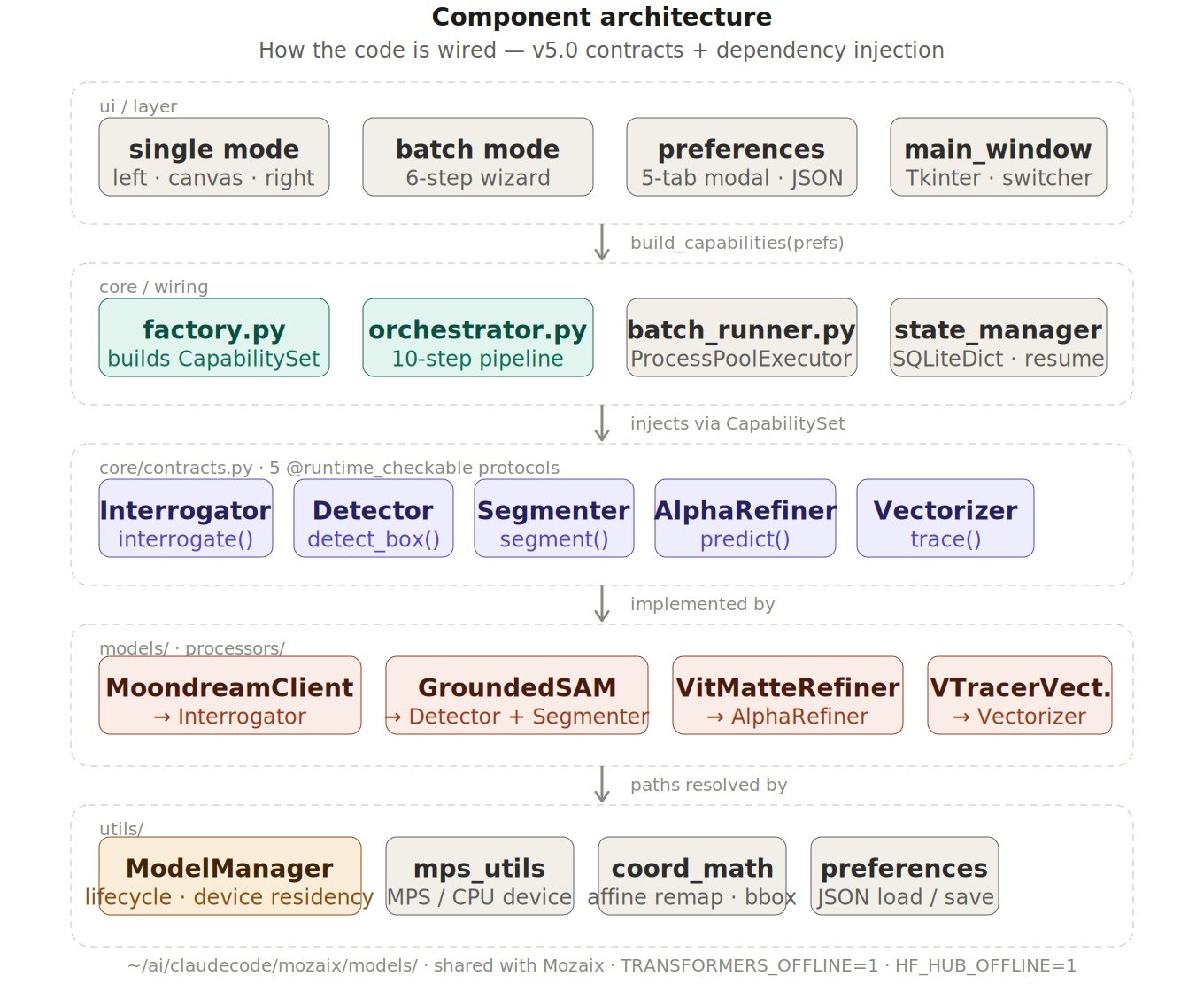
The component architecture of Skiagrafia v5.0: Five layers, each knowing only the one below it. The UI calls build_capabilities(prefs) and receives a bundle. The Orchestrator calls five protocols and never names a model. The concrete clients implement those protocols. ModelManager resolves the paths. The grout between every layer is dependency injection; the tesserae can be swapped without disturbing the mosaic.
IV. The Architecture: How the Tesserae Fit Together
Choosing good materials is necessary but not sufficient. A mosaic made of beautiful tesserae laid without a system is still a mess. The architecture is the system.
Skiagrafia v5.0 is built around a design philosophy the codebase calls "Contracts Without Ceremony." The principle is this: the models should not know about each other. The Orchestrator, the central pipeline manager, should not know which specific model is doing the detecting or the segmenting. It should only know what those things *promise to do*: their interface, their contract.
This is implemented using Python's typing.Protocol system. A Protocol is an interface definition, a specification of what methods an object must expose, without requiring inheritance from any particular class. Skiagrafia defines five capability protocols in core/contracts.py:
- Interrogator — accepts an image, returns structured detection candidates with their roles and detector phrases
- Detector: accepts an image and a text prompt, returns a bounding box with a confidence score
- Segmenter: accepts an image and a bounding box, returns a binary mask
- AlphaRefiner: accepts an image and a mask, returns a soft alpha matte
- Vectorizer: accepts a binary mask, returns SVG path data as a string
These five promises are bundled into a CapabilitySet, a Pydantic dataclass holding one of each, and injected into the Orchestrator at construction time. The Orchestrator never imports moondream_client.py. It never imports grounded_sam.py. It calls self._capabilities.interrogator.interrogate(...) and trusts that whatever is on the other end fulfills the Interrogator contract.
The practical consequence: swapping any model in the pipeline, replacing Moondream with a different VLM, or VTracer with a future tracing engine, requires writing one new class that implements the relevant protocol. The Orchestrator, the batch runner, and the UI do not change.
This is not over-engineering. It is the minimum viable architecture for a system intended to evolve.
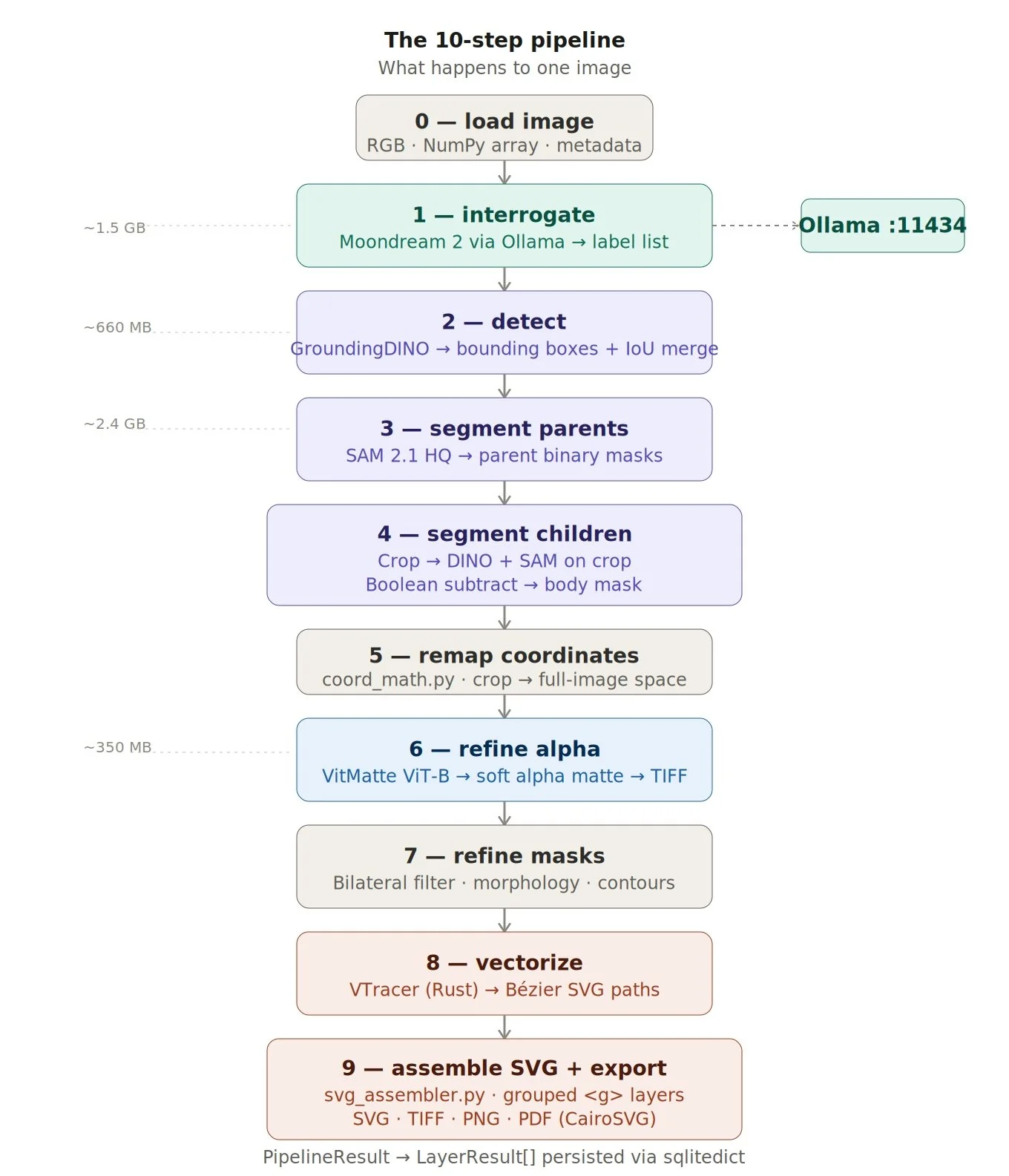
Every image that enters Skiagrafia travels through ten steps in sequence, from a raw file to a structured SVG with named, layered groups. The color coding maps directly to function: teal for interrogation, purple for detection and segmentation, blue for alpha refinement, and coral for vectorization. The model weights noted in the left margin add up to roughly 5GB of local inference, none of it touching the network.
The 10-Step Pipeline
With the architecture described, here is what actually happens when Skiagrafia processes one image. The Orchestrator in core/orchestrator.py executes ten structural steps in sequence:
Step 0: Load image. The image file is read and converted to RGB. Metadata is extracted. The NumPy array that will travel through every subsequent step is created here.
Step 1: Interrogate. The GuidedInterrogator calls Moondream via Ollama's HTTP API. The response is parsed into InterrogationCandidate objects — each containing a canonical label, a role (parent or child), a list of detector phrases optimized for GroundingDINO, and a confidence score. If the primary VLM returns insufficient results, the fallback chain fires.
Step 2: Detect. GroundingDINO processes the full-resolution image against the detector phrases for each parent label. The GroundedSAM wrapper returns DetectionResult objects containing bounding boxes and confidence scores. Overlapping detections are merged using IoU (intersection-over-union) at a threshold of 0.50 — preventing the same object from being detected twice under different phrases.
Step 3: Segment parents. SAM 2.1 HQ processes each bounding box and returns a binary mask. A coverage filter (MIN_PARENT_COVERAGE_PCT) rejects masks that are too small relative to the image, preventing false positives from producing trivial results.
Step 4: Segment children. For each parent with associated child labels from interrogation, the pipeline crops the original image to the parent's bounding box (expanded 30% for context), runs GroundingDINO on the crop to detect child objects, and runs SAM on each detection. Child masks that don't overlap the parent region are discarded. Each accepted child mask is boolean-subtracted from the parent, producing the "body" mask: the parent with all identified children removed.
Step 5: Remap coordinates. Child masks exist in crop-space coordinates. coord_math.py remaps them back to full-image space using the original crop parameters.
Step 6: Refine alpha. If the output mode includes bitmap (TIFF/PNG), VitMatte processes each mask against the original image to produce a soft alpha matte. Results are written to TIFF files with four channels.
Step 7: Refine masks. Bilateral filtering (cv2.bilateralFilter), morphological operations, and contour filtering clean up the masks before vectorization — removing noise, closing holes, smoothing jagged boundaries that would produce poor vector output.
Step 8: Vectorize. VTracer processes each refined mask and returns SVG path data. The configurable spline parameters control the quality-versus-simplicity trade-off.
Step 9: Assemble SVG and export. svg_assembler.py groups all layers into a structured SVG document with a logical hierarchy: parent groups contain child groups, each labelled with the object's canonical name:
xml
The PipelineResult Pydantic model accumulates LayerResult objects throughout this process. If any step fails for a particular label, the error is recorded and processing continues with the remaining labels. The pipeline degrades gracefully.
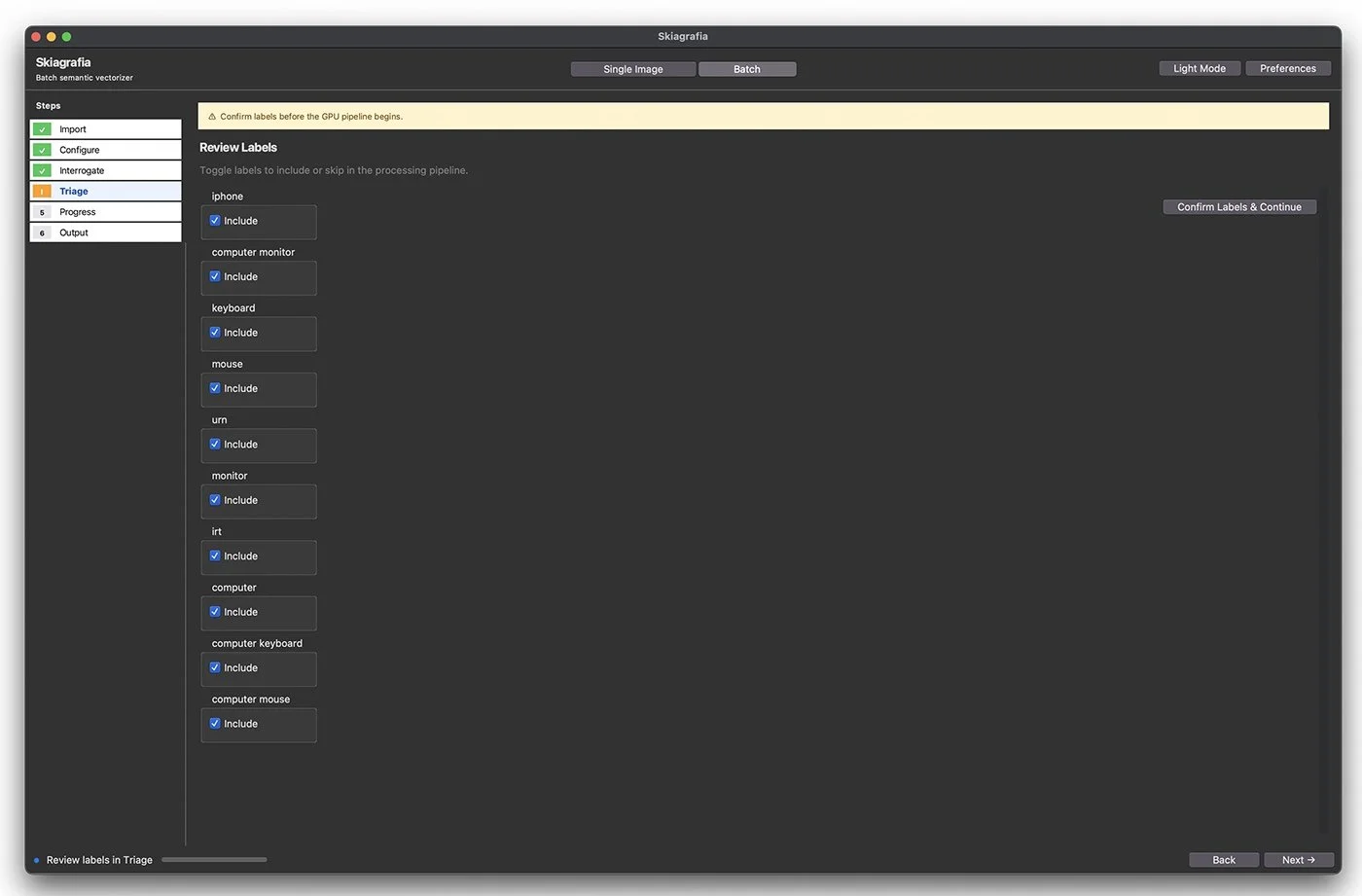
The Triage step: The mandatory human gate before the GPU pipeline fires. Moondream has scanned the batch and surfaced ten unique labels; the designer now decides which ones are worth the compute. This ten-minute review is what prevents two hours of processing garbage. The amber step indicator and the warning banner at the top make clear: nothing moves forward until a human has looked at this.
The Component Diagram
To make this concrete, here is the full component architecture of Skiagrafia v5.0:
UI Layer
main_window.py · batch_runner.py · step_progress.py
Reads preferences → builds concrete clients → injects via CapabilitySet
│
│ passes CapabilitySet
▼
Orchestrator (core/orchestrator.py)
Knows ONLY the Protocol interfaces
Never imports a concrete model client
│
│ calls Protocol methods
▼
Capability Protocols (core/contracts.py)
Interrogator · Detector · Segmenter · AlphaRefiner · Vectorizer
│
│ implemented by
▼
Concrete Model Clients (models/)
moondream_client.py · grounded_sam.py · vitmatte_refiner.py
+ VTracerVectorizer (processors/vectorizer.py)
│
│ paths resolved by
▼
ModelManager (utils/model_manager.py)
User-configurable models_dir from preferences
Registry of known models with download URLs
Device residency tracking and memory-aware unload
The factory.py module is the wiring layer: it reads user preferences, instantiates ModelManager with the configured models directory, builds each concrete client, and assembles the CapabilitySet. The UI and batch runner call build_capabilities(prefs) and receive a ready-to-inject bundle — without knowing anything about how it was assembled.
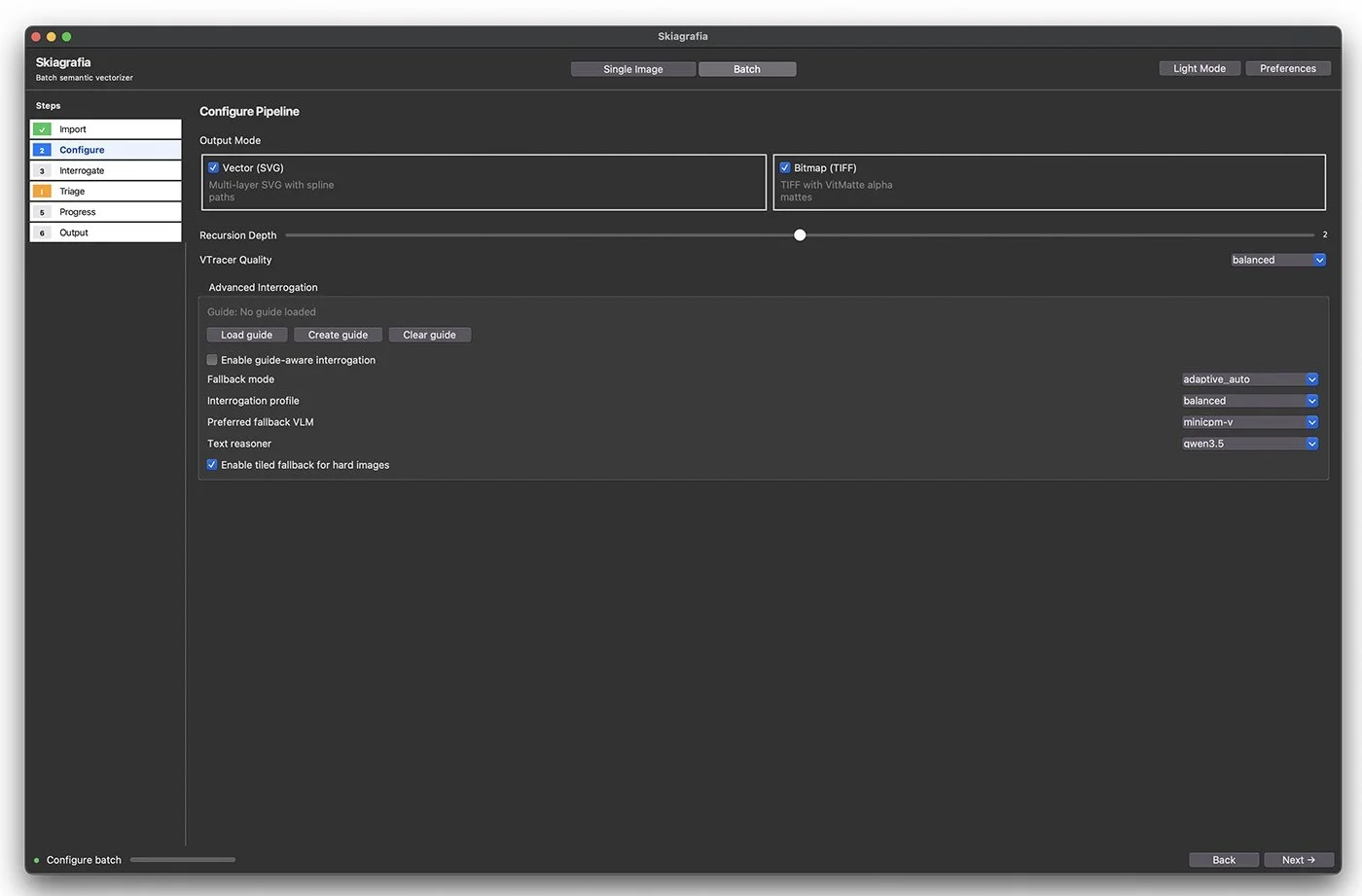
Step 2 of the batch wizard: Configure Pipeline, where the output contract for the entire batch is set before a single model loads. Both Vector (SVG) and Bitmap (TIFF) outputs are selected, the recursion depth is set to 2, and the full interrogation fallback chain is configured: MiniCPM-V as fallback VLM, Qwen 3.5 as text reasoner, and tiled fallback enabled for difficult images. Decisions made here govern every one of the 2,000 images that follow.
The Batch Pipeline
Skiagrafia has two operating modes. Single Image mode provides an interactive three-panel layout, controls on the left, a zoomable canvas in the center, and layers on the right, designed for iterative designer workflows. Batch mode is a six-step wizard designed for production.
The six steps are not arbitrary. They encode a deliberate sequencing of human and machine responsibility:
1. Import: Select a folder of images or load a saved template. Configure recursion depth and file extension filters.
2. Configure: Set output formats (SVG, TIFF, PNG, PDF), VTracer parameters, and naming conventions.
3. Interrogate: Moondream scans all images in parallel, producing a tag cloud: a JSON object mapping each image filename to a list of detected labels. 2,000 images are typically completed in under an hour.
4. Triage: The mandatory human gate. The user reviews the complete list of labels: accepts useful labels, rejects incorrect ones, and edits labels that are almost correct. The pipeline cannot proceed until this step is completed.
5. Progress: The full 10-step pipeline runs on all triaged images. batch_runner.py coordinates parallel processing via ProcessPoolExecutor. State is persisted to SQLite via sqlitedict, so an interrupted batch can be resumed without reprocessing completed images.
6. Output: Summary statistics: images succeeded, failed, layers produced. Failed images can be retried individually.
The Triage step is the most important architectural decision in the batch pipeline. It would be possible to remove it, to run interrogation and segmentation in a single pass. But that would mean committing GPU resources to thousands of images based on labels no human has verified. VLMs make errors. They misname objects, confuse similar-looking things, and miss important elements. Catching those errors before the GPU pipeline fires is the difference between a batch that produces 2,000 useful assets and one that produces 2,000 garbage outputs that all need reprocessing.
The Triage step is the human in the mosaic. The one who looks at the tesserae before they are set in grout.
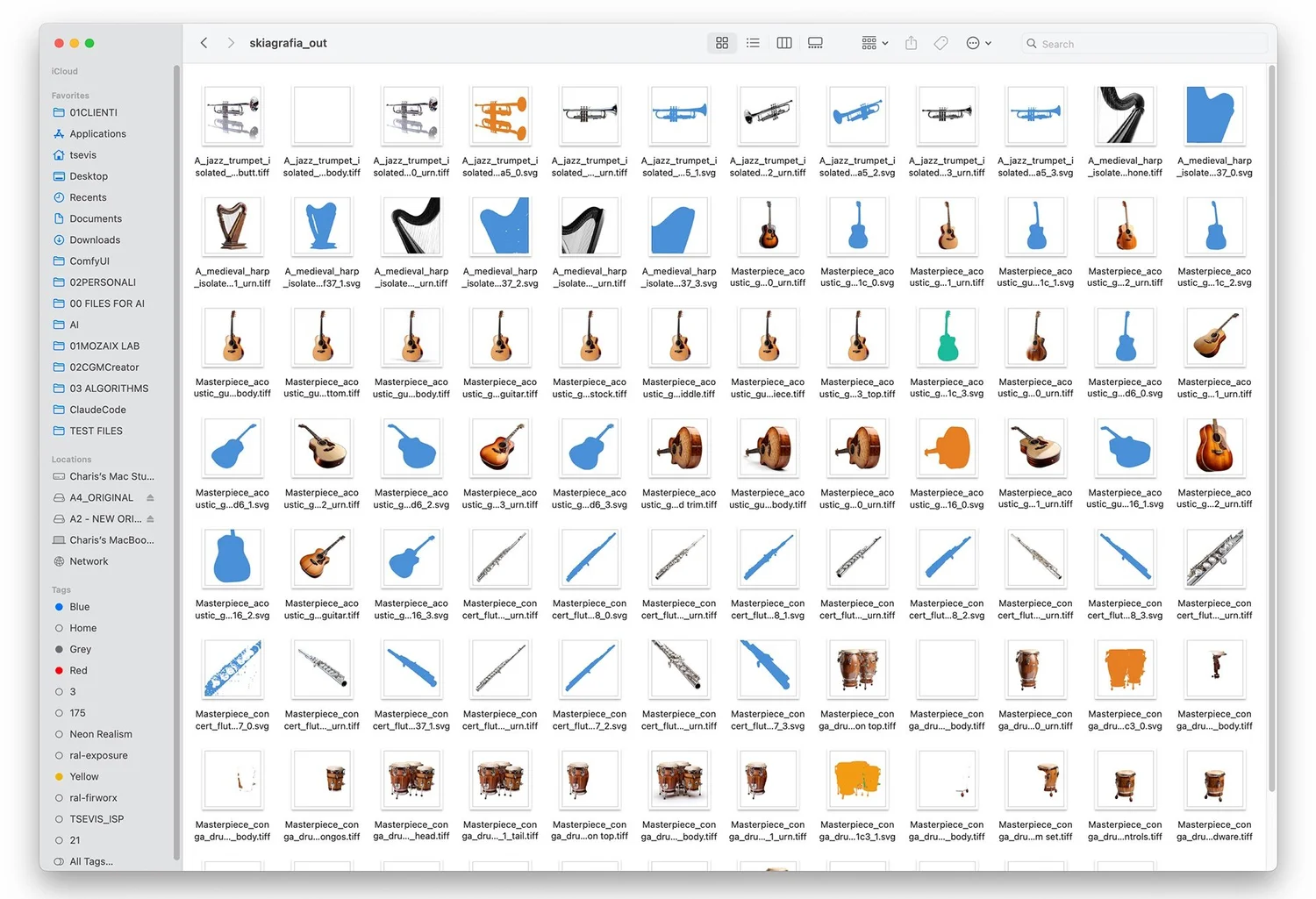
The skiagrafia_out folder after a batch run on a collection of musical instrument photographs. Each source image has produced multiple output files, TIFF bitmaps with alpha channels and SVG silhouettes in solid blue, one per detected layer. Trumpets, harps, acoustic guitars, flutes, concert flutes, congas: every instrument isolated, every silhouette clean, every file named with the image source and the label that produced it. This is what 2,000 images look like when the pipeline has finished laying its tesserae.
V. What the Mosaic Teaches: Design Principles in Practice
Building Skiagrafia across five architectural versions has been its own design education. I want to extract the principles that feel genuinely true, not truisms, but things I had to learn by doing it wrong first.
No single piece does everything. The first instinct when building an AI pipeline is to reach for a large, general model that can do it all: a massive multimodal model that understands images, generates labels, performs segmentation, and outputs clean vector paths in one call. This is the wrong instinct. Specialization produces quality. Moondream is a better interrogator than GPT-4V for this task because it is fast and small, not despite it. SAM is a better segmenter than any general-purpose model because it was trained specifically for that task. VTracer is a better vectorizer than anything a neural network currently produces because it is a deterministic geometric algorithm rather than a statistical approximation.
The mosaic lesson: choose each tesserae for what it does best, not for how few tesserae you can get away with.
The grout matters as much as the tesserae. The models are the visible part of Skiagrafia. The invisible part is everything that holds them together: the coordinate remapping in coord_math.py, the IoU merging in detection, the coverage filters that prevent trivial masks from polluting the output, the boolean subtraction that produces body masks, and the error handling that lets the pipeline continue when a single label fails. None of this appears in a benchmark. All of it determines whether the output is useful.
The grout is the Orchestrator. A pipeline with excellent models and a poor Orchestrator still produces poor output.
Graceful degradation over catastrophic failure. Every stage in the pipeline can fail for any image: the VLM might produce no usable labels; the detector might find nothing; the segmenter might produce a mask below the coverage threshold. In every case, Skiagrafia records the error and continues. The PipelineResult captures failures at the layer level, not the image level: a single image can produce three successful layers and one failed layer, and all three successful results are preserved and exported.
A mosaic with a few missing tesserae is still a mosaic. A system that halts on the first error is not useful in production.
Human judgment at the gate. The mandatory Triage step is not a UX compromise. It is an engineering decision about where in the pipeline the human adds the most value. Interrogation is something a VLM does reasonably well, but not perfectly. Reviewing 50 unique labels across 2,000 images and marking which ones are valid takes a designer approximately ten minutes. Running those 2,000 images through the GPU pipeline takes approximately two hours. Ten minutes of human attention prevents two hours of computer waste.
Contracts over coupling. The Protocol-based architecture of v5.0 was not the first architecture of Skiagrafia. Earlier versions had the Orchestrator directly importing and instantiating model classes. This worked, but any change to any model was a risk across the entire system. The v5.0 refactor, defining clean Protocol interfaces and injecting implementations, meant that when OmniSVG proved to be the wrong tool (too heavy, too fragile, aesthetically mismatched), replacing it with a lightweight PosterStyler using K-Means color quantization required writing one new class and updating factory.py. Nothing else changed. The mosaic accepted a new tessera without disturbing the grout around it.
Design for substitution. The contract between materials matters more than which specific material you use.
Know when to remove a piece. OmniSVG was in the system for weeks. It was a neural SVG generation model, promising in theory but problematic in practice: enormous weights, fragile setup, inference time incompatible with batch processing, and outputs that didn't look like logotype-quality tracing. The decision to remove it entirely was correct, and it was correct precisely because the Protocol architecture made removal safe. This is a principle that mosaics teach: not every fragment you cut belongs in the final work. The quality of the composition depends as much on what you leave out as what you include.
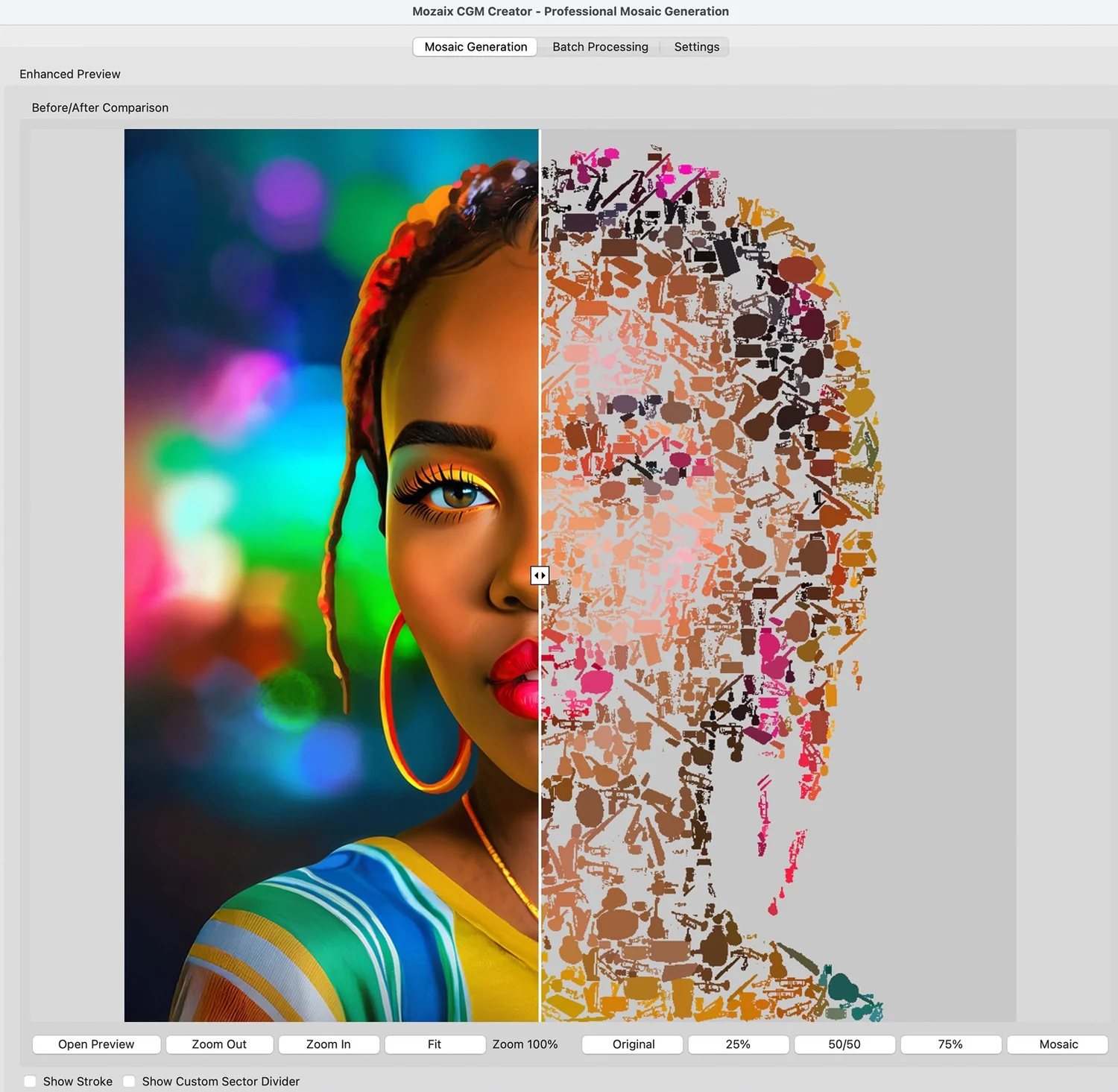
Mozaix CGM Creator, the sibling application, shows a before/after split of a portrait being rebuilt from musical instrument silhouettes. On the left, the source photograph: a woman's face against a bokeh background of colored lights. On the right, the same face reconstructed as a mosaic of tiny trumpets, guitars, flutes, and other instruments, each one a tesserae cut by Skiagrafia and now placed by Mozaix. The two apps are one system: Skiagrafia cuts the pieces, Mozaix lays the mosaic.
An Invitation to Mess With the Pieces
I want to be honest about what Skiagrafia is and isn't.
It is not a finished product. It is v5.0 of a system that has been redesigned from scratch four times. The health check suite, a 16-category diagnostic that verifies the environment, model weights, protocol conformance, and pipeline data contracts, exists because things broke in ways I didn't anticipate.
But it is also not exotic. Every component in Skiagrafia is open-source and independently installable.
Ollama installs with a single Homebrew command. The Ollama Python client exposes the same HTTP API as Skiagrafia. You can interrogate an image with Moondream in about 20 lines of Python.
SAM 2.1 runs in a Jupyter notebook. The Meta research repository includes example notebooks that process images in under five minutes of setup.
VTracer is pip install vtracer. It accepts a PNG path and a parameters dictionary and returns SVG path data as a string. You can wire it to any mask-generating process in an afternoon.
GroundingDINO has a pip-installable wrapper and numerous tutorials. A working text-to-bounding-box pipeline takes an hour on Apple Silicon.
The architecture of Skiagrafia is a specific answer to a specific problem. But the components are building blocks, and the questions it asks: "What's in this image? Where is that thing? What are its exact boundaries? " How do I turn that boundary into a clean curve?" arises in dozens of design and production workflows.
What repetitive image task do you do by hand? Background removal across hundreds of product photos? Logo extraction from brand archives? Silhouette generation for motion graphics? Mask creation for composite photography? Each of these is a mosaic problem. The AI tools that exist today are the tesserae. The question is how you arrange them.
Start with the smallest possible version of the problem. One model. One image. One output. Understand what the model does well and what it gets wrong. Then add the next piece. The architecture grows from that understanding; it doesn't precede it.
The sketches at the beginning of this article are not embarrassing. They are the most honest part of the process. They show what the system looked like before I knew what it needed to be.
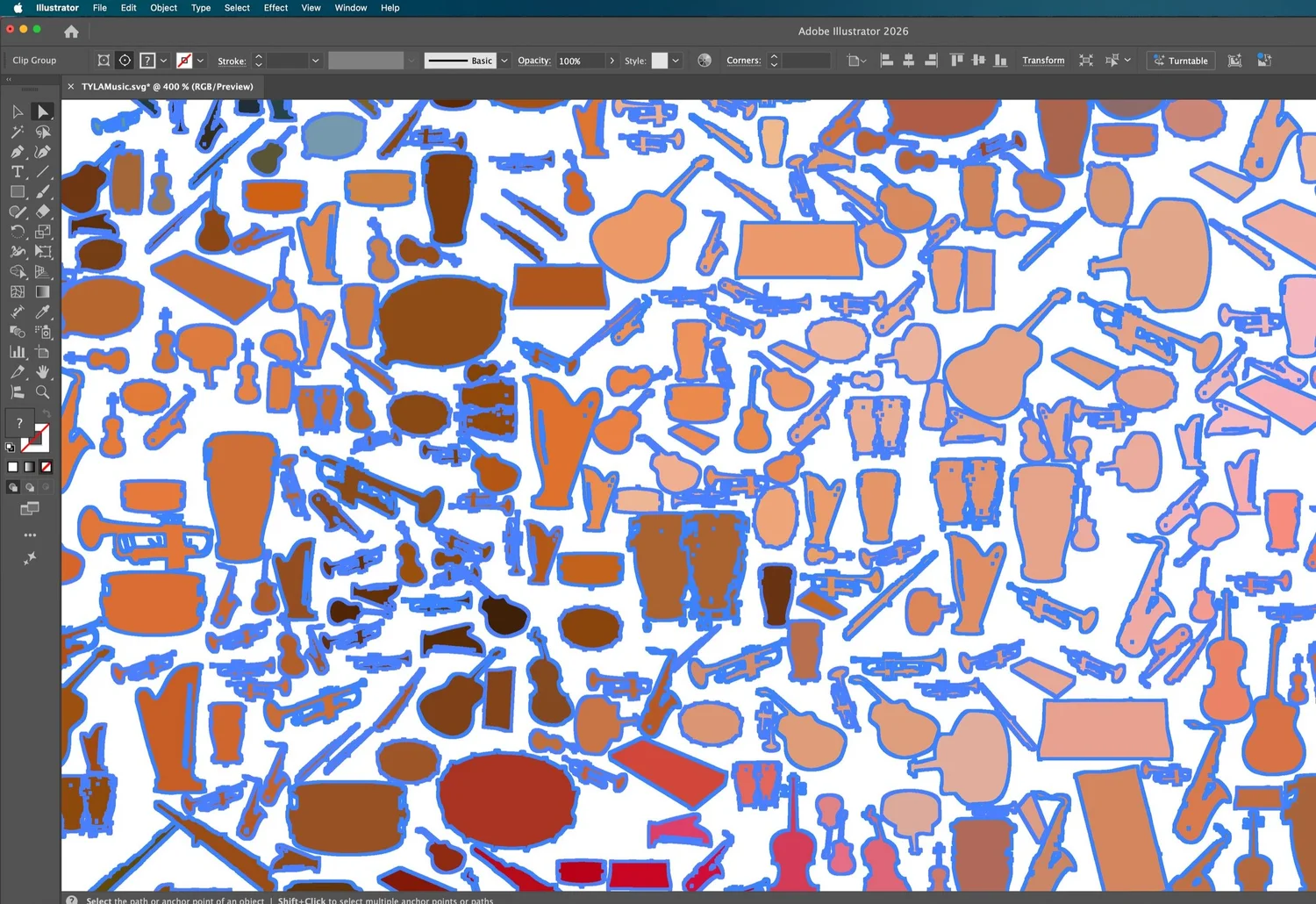
The SVG output of a Skiagrafia batch opened in Adobe Illustrator at 400% zoom, showing hundreds of instrument silhouettes as fully editable vector paths. Each shape has a blue selection outline, confirming it is an independent, scalable object. This is what logotype-quality tracing looks like at the path level: clean Bézier curves, no pixel jagging, ready for print at any size.
VII. The Full Picture
A mosaic, seen up close, is chaos. Fragments of glass and stone, cut edges and grout lines, color that doesn't make sense until you step back far enough.
From the right distance, it becomes an image. But the image was always there, in the arrangement, not in any single piece.
Skiagrafia works the same way. Moondream's 100-millisecond interrogation is not intelligence. The bounding box of DINO's groundings is not understood. SAM's mask is not knowledge. VitMatte's alpha edge is not artistry. VTracer's Bézier curve is not designed.
The intelligence is in the hand-off: in the coordinate remapping that connects SAM's crop-space mask to VTracer's full-image canvas; in the IoU threshold that merges duplicate detections; in the coverage filter that rejects trivial masks; in the triage gate that keeps a human in the loop. The design is in the decision about what to build and what to leave out. The artistry is in understanding which model tells the truth about which kind of problem.
After thirty years of laying mosaics, this is the principle I keep returning to: the meaning of a system is not stored in its components. It emerges from their relationships.
Skiagrafia is v5.0. It will be v6. There are models on the horizon, better VLMs, improved segmentation architectures, and faster vectorization that will change specific tesserae without changing the mosaic logic. The grout stays. The relationships stay. The contracts stay.
The mosaic is never finished. It is always being laid.
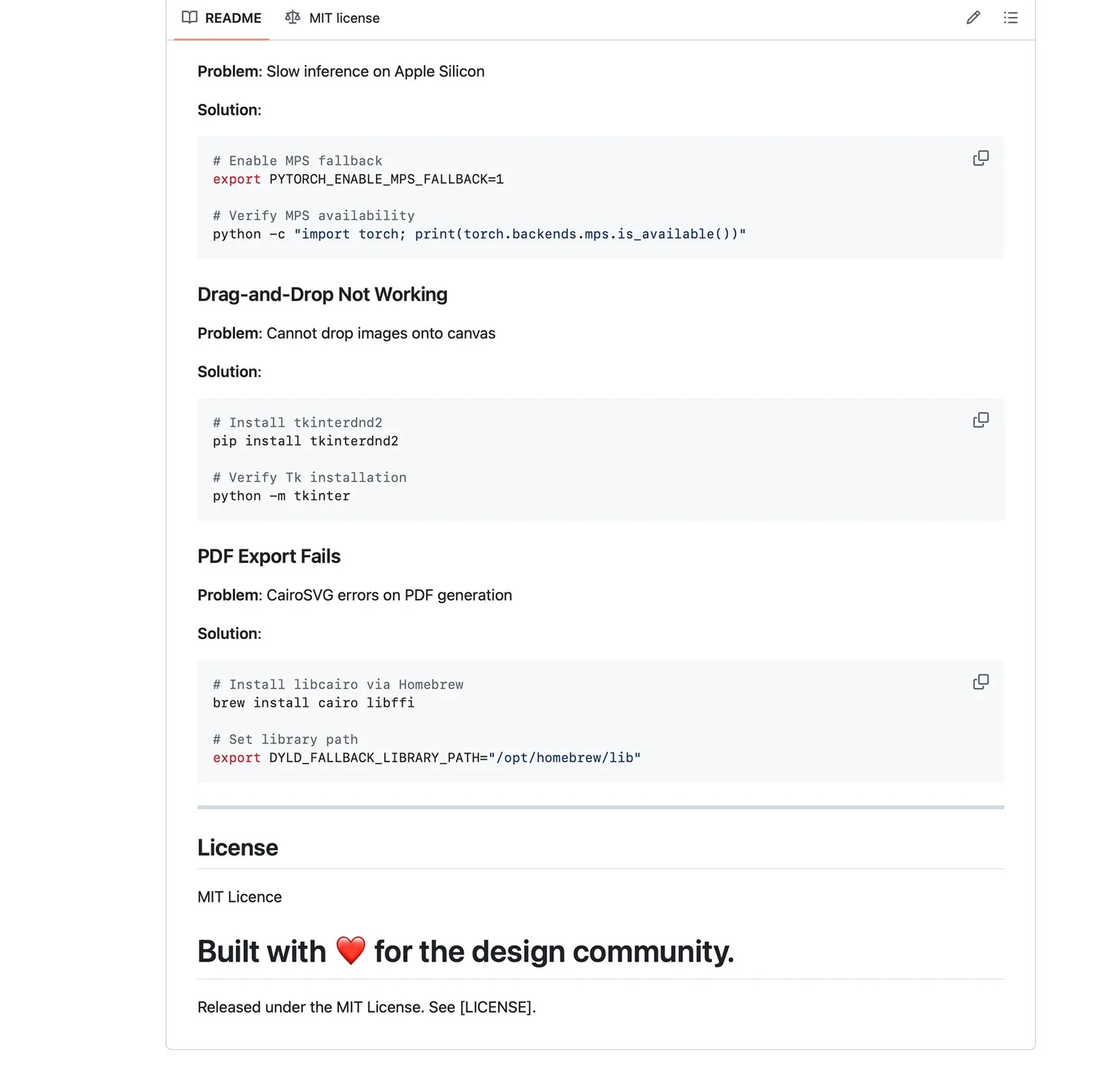
The closing section of the Skiagrafia README on GitHub, practical troubleshooting for the three most common setup problems on Apple Silicon, followed by the license and a closing line that says what the project is actually for.
Glossary:
Vision-Language Model (VLM): An AI model that accepts both images and text as input and generates text output. Moondream and LLaVA are VLMs. They can answer questions about images, describe what they see, or generate labels.
Segmentation mask: A binary image (black and white) where white pixels represent the detected object and black pixels represent the background. More sophisticated masks have fractional (alpha) values at the boundary.
Alpha matte: A grayscale image where each pixel's value (0–255) represents how much of that pixel belongs to the foreground object. Used for soft-edge compositing. VitMatte produces alpha mattes.
Bounding box: A rectangle that approximately encloses a detected object, specified as four coordinates (x_min, y_min, x_max, y_max). GroundingDINO produces bounding boxes.
SVG path / Bézier curve: An SVG
MPS (Metal Performance Shaders): Apple's GPU acceleration framework for machine learning on Apple Silicon. The equivalent of NVIDIA's CUDA for Mac.
Dependency injection / Protocol: A software design pattern where a component declares what kind of help it needs (a "protocol" or interface) without specifying which concrete implementation it will receive. The concrete implementation is "injected" from outside. Enables modular, testable, swappable architectures.
IoU (Intersection over Union): A measure of overlap between two regions — the area of their intersection divided by the area of their union. Used in Skiagrafia to merge duplicate bounding box detections.
Boolean subtraction: In masking, removing one mask from another. Used in Skiagrafia to compute "body" masks: parent region minus all child regions.
Trimap: The input to an alpha matting algorithm — a rough three-zone segmentation (foreground, background, uncertain boundary) that VitMatte uses to produce a refined soft-edge alpha matte.
Try It Yourself
The components used in Skiagrafia are independently available:
Ollama (local model runtime): ollama.com: Install via Homebrew, ollama pull moondream to get the model
Moondream (vision-language model): moondream.ai. Also available via Hugging Face
GroundingDINO (text-conditioned detection): github.com/IDEA-Research/GroundingDINO
Segment Anything Model (SAM 2.1): github.com/facebookresearch/sam2
VitMatte (alpha matting): available on Hugging Face as hustvl/vitmatte-base-composition-1k.
VTracer (bitmap-to-vector): pip install vtracer: github.com/visioncortex/vtracer
Skiagrafia (the full system): github.com/tsevis/skiagrafia
The minimum viable experiment: install Ollama, pull Moondream, write 20 lines of Python that interrogate an image and print the labels. Then add GroundingDINO. Then SAM. The architecture grows from understanding, not from planning.
Charis Tsevis is a visual artist and designer with over 30 years of practice in mosaic, digital illustration, and design systems. He is the developer of Skiagrafia, Hipparchus, Mozaix, and other apps.